Moneydance vs Quicken comes down to a one-time license versus a subscription, cross-platform support, and where your data lives. Here is how the two personal finance apps compare — and which to pick.
Moneydance 2024.4 · US$65 one-time · Windows, macOS & Linux
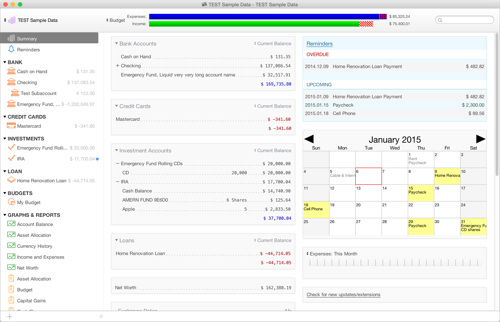
Moneydance vs Quicken is a choice between a one-time purchase and a subscription. Moneydance is a cross-platform desktop app (Windows, macOS, Linux) sold as a single US$65 license with data stored locally on your machine. Quicken is a long-established, subscription-based personal finance product with separate Windows and Mac editions and bundled online services. Both handle budgeting, online banking and investment tracking; the differences are pricing model, platform coverage and data ownership.
| Moneydance | Quicken | |
|---|---|---|
| Pricing model | One-time US$65 license | Annual subscription |
| Platforms | Windows, macOS, Linux | Windows and Mac (separate editions) |
| Data storage | Local, encrypted on your device | Local file with cloud/companion services |
| Online banking | 11,000+ institutions via Moneydance+ | Broad US institution coverage |
| Investment tracking | Yes — securities, cost basis, quotes | Yes (Premier/Home & Business tiers) |
| Mobile app | Free iOS & Android companion | Companion mobile/web app |
| Data import | QIF, OFX/QFX, CSV (incl. from Quicken) | QIF/OFX, Quicken formats |
You want a one-time purchase with no subscription, run macOS or Linux, and prefer your financial data stored locally and encrypted on your own machine.
You are already deep in the Quicken ecosystem, rely on its specific US bill-pay and premium online services, and don't mind an ongoing subscription.
Moneydance imports QIF, OFX/QFX and CSV exports from Quicken, so you can bring account history with you. Start on the free trial before you buy.
The headline gap is the payment model. Moneydance is a single US$65 purchase that keeps working indefinitely, with a free upgrade to the next major release; you only pay again if you choose the optional Moneydance+ bank-sync add-on (around US$40 per year). Quicken is billed as a recurring annual subscription that stops delivering updates and some online services when it lapses. Over a typical three-to-five-year horizon a one-time Moneydance license usually costs a fraction of stacked Quicken renewals — the trade-off is that Quicken bundles certain US bill-pay and premium web features that Moneydance leaves to your bank or the Moneydance+ service.
 Moneydance