Moneydance vs GnuCash is a paid, polished app versus a free, open-source double-entry ledger. Here is how the two personal finance tools compare on cost, ease of use and online banking — and which to pick.
Moneydance 2024.4 · US$65 one-time · Windows, macOS & Linux
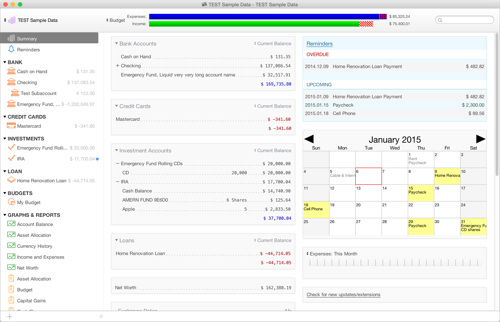
Moneydance vs GnuCash is a choice between a paid, polished app and a free open-source ledger. Moneydance is a US$65 one-time license with an approachable interface, easy online banking through Moneydance+, and cross-platform builds for Windows, macOS and Linux. GnuCash is free and open-source, built around formal double-entry accounting with powerful reports but a steeper learning curve. Both are cross-platform desktop apps; the differences are cost, ease of use, bank connectivity and support.
| Moneydance | GnuCash | |
|---|---|---|
| Pricing | One-time US$65 license | Free and open-source |
| Ease of use | Polished, approachable UI | Functional but steeper learning curve |
| Online banking | Easy sync via Moneydance+ (11,000+ institutions) | OFX/QFX import; manual setup, fewer direct connections |
| Platforms | Windows, macOS, Linux | Windows, macOS, Linux |
| Learning curve | Gentle — usable in minutes | Steeper — formal double-entry model |
| Support | Paid vendor support & forums | Community only — no paid support |
| Investment tracking | Yes — securities, cost basis, quotes | Yes — full double-entry with stock accounts |
You want a polished interface and easy online bank sync, are happy to pay once for a US$65 license, and would rather spend time managing money than learning accounting rules.
You want a free, open-source tool, value strict double-entry bookkeeping and detailed reports, and don't mind a steeper learning curve or the lack of paid support. GnuCash costs nothing to download.
Export a QIF or CSV file from GnuCash, then use File › Import in Moneydance to bring in your account history. Start on the free trial before you buy a license.
The headline difference is price against polish. GnuCash is completely free: an open-source project with no license fee, funded by volunteers, offering full double-entry accounting, multi-currency support and a deep report engine. What you pay instead is time — its formal ledger model and manual bank-import workflow take longer to learn. Moneydance charges a one-time US$65 for a smoother experience: a friendlier interface, guided online banking through Moneydance+, a free mobile companion and paid vendor support if something breaks. If your budget is zero and you are comfortable with accounting concepts, GnuCash is hard to beat. If you would rather pay once and get set up quickly with easy bank sync, Moneydance earns its price.
 Moneydance