Moneydance ships with a built-in Extensions manager and an open developer API, so you can add importers, reports, investment tools and automation to the core personal finance app. Most add-ons are free and community-built.
Version 2024.4 · Windows, macOS & Linux · Free trial, then US$65 one-time
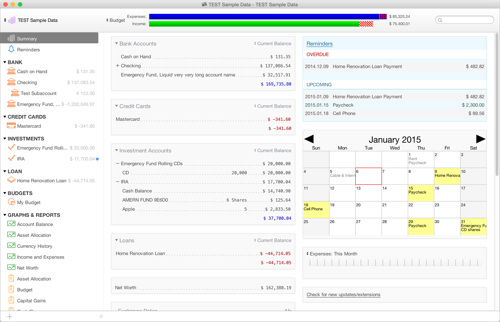
Moneydance extensions are optional add-ons that plug into Moneydance, the cross-platform personal finance app by The Infinite Kind, through its built-in Extensions manager and open developer API. They add capabilities the core program does not include out of the box — file-format importers, extra reports and charts, investment and account tools, and small automations — and most are free, community-built modules packaged as .mxt files that you install from inside the app.
Moneydance is designed to be extensible. Beyond the budgeting, online banking, bill reminders and investment tracking built into the core app, an extension (sometimes called an add-on) hooks into the program to add a specific feature — a new report on the summary page, a widget that totals selected accounts, a reader for an unusual bank export format, or a routine that cleans up transactions in bulk. Extensions are managed from within Moneydance itself rather than being separate applications, so they run against your existing account file and appear alongside the program's own menus and home-page components.
Because Moneydance is written in Java and runs the same way on Windows, macOS and Linux, an extension distributed as a single .mxt package generally works on every platform without a separate build. That keeps the add-on ecosystem small but portable: one file, any operating system, provided the add-on is compatible with your Moneydance version.
.mxt file from a trusted source, choose the option to install from a file and select it.Only install extensions from sources you trust, since an add-on can read and modify your account file. Add-ons distributed through the built-in manager are the safest route, and your Moneydance data stays stored locally on your own machine throughout.
Moneydance publishes an open developer API for anyone who wants to build their own add-on rather than only install existing ones. The API lets a developer read and write the account file, add new reports and summary-page components, register file-format importers, and automate repetitive tasks. Extensions are compiled and packaged into the same .mxt format that the Extensions manager installs, which means a custom tool you build can be shared with other Moneydance users on any platform.
Many of the add-ons in the ecosystem are community projects, some open-source, contributed by independent developers and by The Infinite Kind and collaborators. That open model is why the extension catalog spans everything from niche bank importers to investment analytics: if the core app is missing something a user needs, the API makes it possible to add it. If you only want to use extensions rather than write them, you never need to touch the API — the Extensions manager covers installation, updates and removal on its own.
Moneydance itself is paid software: you can run it as a free trial limited to 100 manually entered transactions with no time limit, and a one-time US$65 license removes that limit and includes a free upgrade to the next major release. The extensions are a separate matter — the large majority are free and community-built, and third-party authors set their own terms for the few that are not. Nothing about installing add-ons changes the one-time, no-subscription pricing of the core program.
On safety, extensions run inside Moneydance with access to your financial data, so the same caution applies as with any software add-on: install from the built-in manager or a source you trust, and keep both Moneydance and your add-ons current. Your account file remains encrypted on your own device rather than in a vendor cloud, which limits exposure even as you extend the app. If you are still evaluating Moneydance, start with the free trial and explore the Extensions menu before buying a license.
.mxt file. The extension registers inside your installation and then appears in the Extensions menu..mxt files..mxt extension works on Windows, macOS and Linux, provided it is compatible with your Moneydance version.Install the free trial, open the Extensions menu, and add the importers, reports and tools you need — then buy a license once for US$65.
 Moneydance