A hands-on look at Moneydance — the private, cross-platform personal finance app. We walk through online banking, budgeting, graphs, account registers, investments and mobile sync, then weigh the pros, cons and price.
Version 2024.4 · Free trial, then US$65 one-time · 90-day money-back guarantee
This Moneydance review covers the cross-platform personal finance app by The Infinite Kind for Windows, macOS and Linux. Moneydance handles online banking, budgeting, bill reminders, account registers and investment tracking, with your data stored privately and encrypted on your own machine. It is a one-time US$65 purchase with a free trial, positioned as a privacy-first alternative to Quicken.
Moneydance is an easy-to-use, full-featured personal finance app that does not compromise your privacy. Unlike many finance tools that route your data through third-party aggregators, Moneydance keeps your file private, encrypted and stored locally on your computer. It runs the same on Windows, macOS and Linux, and the account file is portable between them, so you are not locked to one operating system. The app bundles its own runtime, so there is nothing extra to install, and the free iOS and Android companion apps sync securely with the desktop.
The pitch is straightforward: replicate the day-to-day functionality of big-name finance software — online banking, bill payment, budgeting, investment tracking, multi-currency, and detailed graphs and reports — but do it more simply, without ads, and without a subscription. That framing has made Moneydance a long-standing pick for people leaving Quicken. As one Moneydance review quote below puts it, it is "a viable alternative to Quicken" with a "graceful, simple interface".
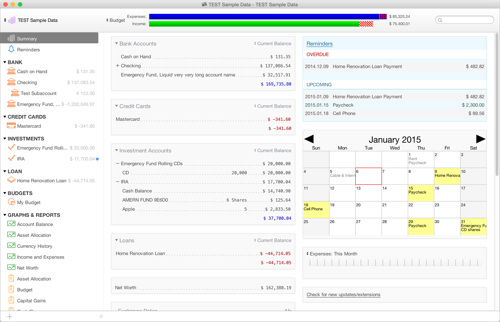
The home screen is an overview of your finances: account balances, upcoming and overdue transactions, reminders and exchange-rate information in one view. Clicking an account jumps straight to its register, and clicking a reminder lets you record the scheduled transaction. It is a practical landing page that answers "where do I stand?" the moment you open the app.
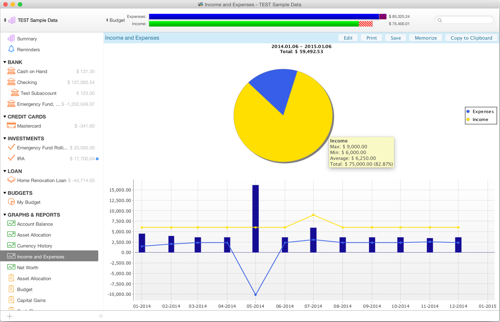
The graphing tool turns income and expenses into visual reports. You choose the graph type, the date range and the settings that matter, and pop-up balloons reveal the underlying figures as you move the pointer across the chart. Graphs can be printed or saved as PNG images, which makes them easy to file with tax or budget notes.
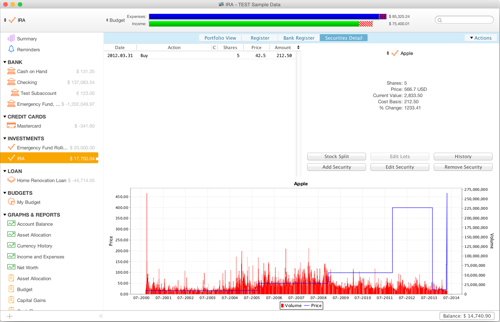
Moneydance brings a portfolio into focus with support for stocks, bonds, CDs, mutual funds and more. You can view the total value of investment accounts or the performance of individual holdings over time. Stock splits and cost-basis computations are handled for you, and current prices can be downloaded automatically.
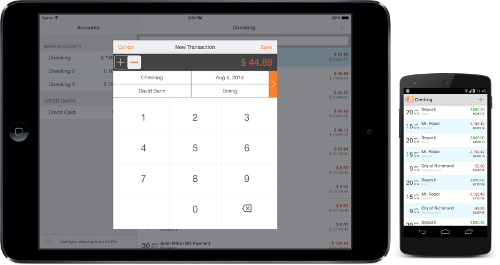
When you are away from the desktop, the Moneydance mobile app lets you enter or edit transactions and check balances. Changes sync instantly and securely back to the desktop file. The companion apps are free for iPhone, iPad and iPod touch on the App Store and for Android devices on the Play Store.
Rounding out the core are online banking, which automatically downloads transactions and sends payments from hundreds of institutions while learning how to categorize and clean up what it imports; account registers that look like a paper checkbook but calculate balances and sort automatically, with payee auto-complete to speed entry; and reminders, where you set a payment schedule for single or recurring transactions so a bill is never missed.
Pros: a one-time US$65 price with no subscription for the desktop app; strong privacy because data stays encrypted on your own machine; genuine cross-platform support across Windows, macOS and Linux with a portable file; a broad feature set covering banking, budgets, investments and multi-currency; free mobile companion apps; and a 90-day money-back guarantee that lowers the risk of trying it.
Cons: automatic bank downloads rely on the optional Moneydance+ add-on, which is a separate subscription of roughly US$40 per year; the interface is functional rather than flashy and can feel dated next to newer web apps; and the free trial caps you at 100 manually entered transactions, so a full evaluation of a busy account really needs the paid license.
"A viable alternative to Quicken — fast, well-designed, regularly updated and well supported, with a very satisfied user base."
— user review"A much more solid contender. It replicates much of Quicken's functionality, in some cases a bit more elegantly, and was strikingly fast."
— user review"Graceful, simple interface. Quicken has grown so bloated; Moneydance is the graceful, simple interface I fell in love with."
— user review"Great, solid program. In the years I've used it I've never lost data, never found ads, and it runs faster and more reliably than Quicken."
— user reviewMoneydance suits anyone who wants a serious desktop money manager without a subscription treadmill or cloud data sharing — households leaving Quicken, privacy-minded users, people who run more than one operating system, and investors who want portfolio tracking alongside everyday budgeting. It is a weaker fit for those who want a purely browser-based experience or who refuse to pay the optional add-on for automatic bank feeds.
Verdict: Moneydance 2024.4 is a capable, privacy-first personal finance app that earns its long-standing reputation as a Quicken alternative. The one-time US$65 price, local encrypted storage and cross-platform reach are its strongest cards, and the 90-day guarantee plus a full-featured free trial make it easy to test with no risk. If you value owning your data and paying once, it is an easy recommendation. Compare it head-to-head on our Moneydance vs Quicken page, or start from the download guide.
Download the full free trial with no time limit, then unlock it once for US$65 with a 90-day money-back guarantee.
 Moneydance